
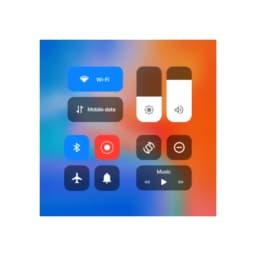
Screenshots
Tentang iCenter OS16 - Control Center
iCenter OS16 - Control Center menghadirkan desain intuitif iOS 16 ke perangkat Android Anda, memberi Anda akses yang efisien ke kontrol dan pengaturan yang paling sering Anda gunakan. Kelola ponsel Anda dengan antarmuka modern yang menempatkan semuanya dalam sekali usap atau ketuk.
Akses cepat ke kontrol penting
Tarik notifikasi dari kiri atas atau buka control center dari kanan atas untuk langsung mencapai alat yang paling sering Anda gunakan. Pemutaran musik, kamera, senter, kalkulator, rotasi layar, Wi-Fi, data seluler, kecerahan, dan Bluetooth semuanya tersedia dari satu layar. Pusat notifikasi bekerja mirip dengan iOS 16, memungkinkan Anda merespons peringatan tanpa meninggalkan aplikasi yang sedang digunakan. Penyesuaian volume dan kecerahan merespons gestur usap, membuat penyesuaian halus menjadi mudah.
Sederhanakan alur kerja Anda dengan sakelar pintar
Aktifkan atau nonaktifkan Wi-Fi, data seluler, Bluetooth, dan kunci orientasi layar dengan satu ketukan. Mode Jangan Ganggu khusus membisukan panggilan dan notifikasi saat Anda memerlukan waktu fokus. Pintasan sekali ketuk memberi Anda akses instan ke kamera, alarm, timer, dan perekam suara—tanpa perlu mencari di laci aplikasi. Control center mengingat status pemutar musik Anda, sehingga kontrol pemutaran selalu siap saat Anda membutuhkannya.
Sesuaikan tampilan dan rasa
Control center menyesuaikan dengan preferensi Anda dengan gaya latar belakang yang dapat disesuaikan dan opsi tampilan notifikasi. Tambahkan pintasan ke aplikasi apa pun di ponsel Anda, mengubah control center menjadi hub pribadi untuk tugas harian Anda. Kombinasi fungsionalitas dan estetika ini berarti control center tetap bermanfaat tanpa terasa berantakan.
Navigasi yang lancar dengan dukungan gestur
Mengusap menjadi cara utama Anda untuk bernavigasi—tarik dari kiri atas untuk notifikasi, atau akses control center dari kanan atas. Gestur intuitif ini mengurangi langkah yang diperlukan untuk mencapai fungsi penting, mempercepat tindakan umum seperti menyesuaikan volume atau mengaktifkan Bluetooth.
Rasakan kontrol perangkat modern dengan iCenter OS16 - Control Center, dirancang untuk memberikan pengguna Android pengalaman antarmuka iOS 16 yang efisien. Membutuhkan Android 5.0 atau lebih tinggi.
Kelebihan & Kekurangan
Kelebihan
- iOS-style control center brings familiar interface to Android
- Quick toggles for Wi-Fi, Bluetooth, Do Not Disturb, and more
- Customizable shortcuts let you add any app to the control center
- Gesture-based navigation reduces steps to access common functions
Kekurangan
- Adds a persistent system-level overlay that may impact battery life
- Requires permission to intercept notifications and system controls
- Customization options may be confusing for users unfamiliar with iOS
- Could conflict with your device's native control center or launcher
Aplikasi Terkait

AlienGUIse
Tema desktop dan manajer untuk Windows — ubah sistem Anda dengan 5 desain futuristik.

SharpKeys
Petakan ulang tombol keyboard untuk membuka aplikasi, kontrol media, dan perintah kustom di Windows.

RocketDock
Peluncur desktop untuk Windows — dock akses cepat dengan ikon dan posisi yang dapat disesuaikan.

Custom Resolution Utility (CRU)
Utilitas resolusi tampilan: Buat resolusi kustom untuk monitor Anda dengan kontrol kecepatan refresh yang presisi.

Lagguy Wallpapers
Lagguy
Wallpaper 4K & HD untuk Android — desain minimalis, abstrak, alam, AMOLED dengan akses seumur hidup

Lock Screen OS
Apps Genz
Sesuaikan layar kunci Anda dengan widget, foto, dan notifikasi. Ganti layar kunci default Android.
Artikel terbaru

Pengonversi angka Romawi gratis online: instan, tanpa daftar, bekerja di ponsel Anda
Oct 6, 2026

Papan tulis online gratis seperti Jamboard: gunakan Quickboard di browser Anda, tanpa pendaftaran
Oct 6, 2026

Mainkan permainan Color Ball Sort Puzzle gratis di browser (tanpa unduhan)
Oct 6, 2026

Mainkan kart racer gaya Beach Buggy Racing gratis di browser (tanpa unduhan)
Oct 6, 2026

Mainkan game bergaya Alto's Adventure gratis di browser (tanpa unduhan)
Oct 6, 2026